Part 2 of “The Test Pyramid — Reimagined.” Start withthe opener if you missed it.
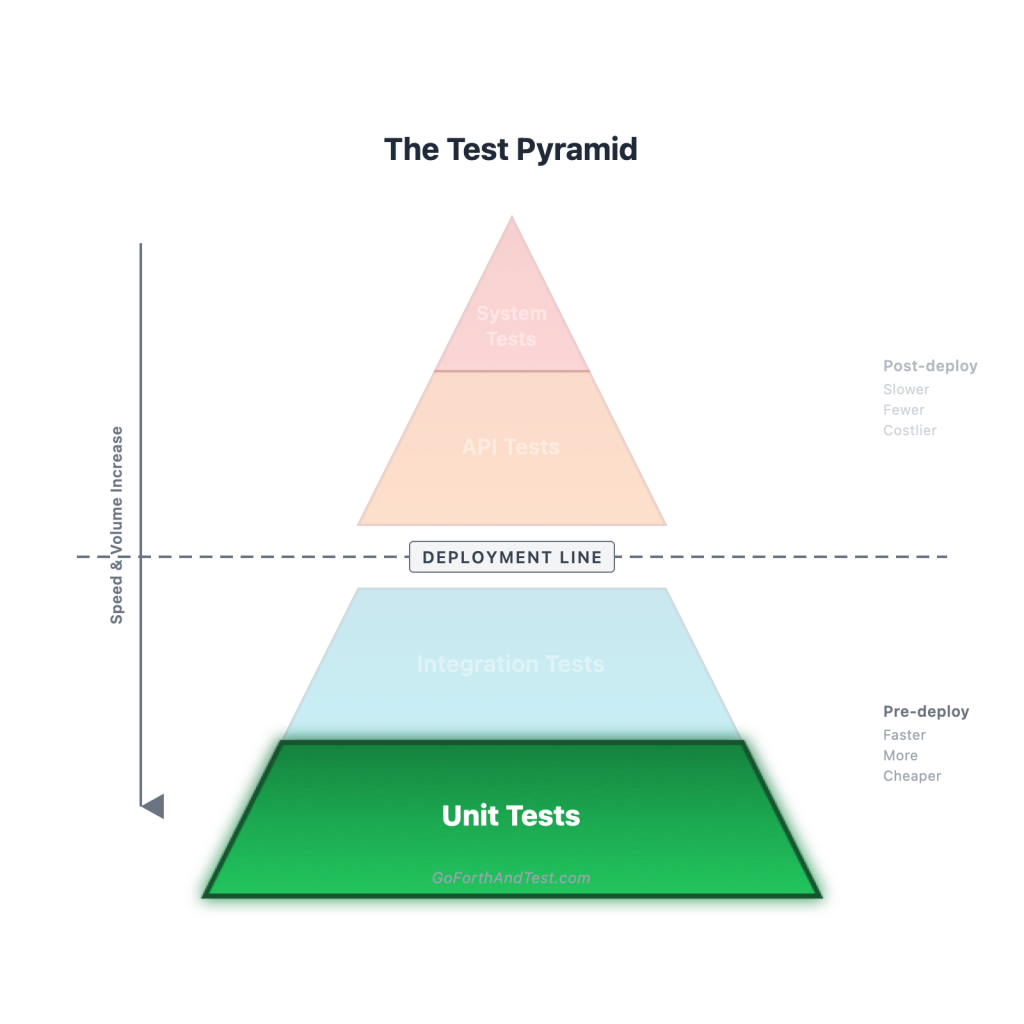
Most of what your team is writing in Selenium today should be a unit test, and you don’t believe me yet.
Stay with me. I’m going to walk you through it, and by the end of this post I think you’ll at least be willing to open a PR and try it.
Here’s the situation in nine out of ten test suites I look at. There’s a sprawl of UI tests — Selenium, Playwright, Cypress, doesn’t matter — that spin up a real browser, navigate to a page, click a button, type into a field, wait for some animation, and assert that the right thing happened. Each test takes a minute or two. The whole suite takes thirty. Half of them are flaky. The team’s collective attitude toward them ranges from “necessary evil” to “actively malicious,” and the SDETs spend a meaningful portion of their week defending the suite’s existence rather than improving the product.
Of those tests, my best guess is that 60 to 80 percent of them are testing component behavior — does this dropdown open when I click it, does this validation message appear when I submit an empty form, does this button get disabled while the request is in flight. That stuff is real, and it’s worth testing. But it does not require a browser. It hasn’t required a browser in a long time. And the reason your team is still doing it in a browser is muscle memory.
That’s the post. Let me show my work.
What I mean by “unit test”
In the opener I gave you the one-line version: mock your own code, one test, one thing. Let me tighten that up.
A unit test, in my model:
- Tests a single unit of behavior — usually one method, one component, one pure function. Not a flow. Not a feature. A unit.
- Mocks your own code where it gets in the way. If the unit under test calls another class you wrote, and that other class isn’t the thing you’re testing, you stub it out. The test should fail when this unit breaks, not when something three layers downstream breaks.
- Has no infrastructure. No database. No network. No browser. No filesystem. A unit test that needs Docker is not a unit test.
- Runs in milliseconds. If a single test takes longer than the time between two heartbeats, you’ve slid down a layer without noticing.
- Tells you which line broke. This is the property that makes unit tests pull more weight than any other layer. When a unit test fails, the failure message is the diagnosis. Every other layer can only tell you that something broke; the unit layer tells you what.
That last property is doing more work in this post than any other. Hold on to it.
The smell test bonus
Here’s the part that surprised me when I figured it out, and that nobody seems to talk about: a unit test is also a test of your code’s quality.
If you sit down to write a unit test for a method and find yourself mocking ten different collaborators just to get the thing into a runnable state, the test is telling you something. It is not telling you “unit tests are hard.” It is telling you the method is doing too much. It depends on too many things. It can’t be reasoned about in isolation, which means whoever wrote it can’t reason about it in isolation, which means bugs in it are going to be a recurring feature of your sprint planning.
The test is the canary in the coal mine. The pain you’re feeling writing the test is exactly proportional to the pain the next developer will feel modifying the code.
This is why I get a little twitchy when teams treat “we don’t write unit tests, we write integration tests instead” as a neutral, value-free strategic choice. It isn’t. Skipping the unit layer means skipping the early-warning system that tells you when your production code is decaying. By the time your integration tests are reporting a problem, the code has been ugly for a while.
The unit layer doesn’t just test the code. It pressures the code. Take that pressure away and the code goes soft.
What a clean unit test looks like
Before we get to the muscle-memory part, let me anchor the abstract stuff in code. Same test, two languages, both pre-deploy, no infrastructure, milliseconds.
Java + JUnit 5 + Mockito — testing a DiscountService that depends on a MembershipClient we don’t want to actually call:
class DiscountServiceTest {
    private MembershipClient membershipClient;
    private DiscountService discountService;

    @BeforeEach
    void setUp() {
        membershipClient = mock(MembershipClient.class);
        discountService = new DiscountService(membershipClient);
    }

    @Test
    void appliesGoldTierDiscountWhenMemberIsGold() {
        when(membershipClient.tierFor("user-42")).thenReturn(Tier.GOLD);

        BigDecimal discounted = discountService.apply("user-42", new BigDecimal("100.00"));

        assertThat(discounted).isEqualByComparingTo("85.00");
    }

    @Test
    void appliesNoDiscountForNonMembers() {
        when(membershipClient.tierFor("user-99")).thenReturn(Tier.NONE);

        BigDecimal discounted = discountService.apply("user-99", new BigDecimal("100.00"));

        assertThat(discounted).isEqualByComparingTo("100.00");
    }
}
One unit. One thing per test. The MembershipClient is mocked because it isn’t what we’re testing. If tierFor is buggy, that’s a problem for MembershipClientTest, not this one. When appliesGoldTierDiscountWhenMemberIsGold fails, you know exactly where to look — and you know it without leaving your IDE.
TypeScript + Jest + React Testing Library — testing a <DiscountBadge /> component:
import { render, screen } from "@testing-library/react";
import userEvent from "@testing-library/user-event";
import { DiscountBadge } from "./DiscountBadge";

describe("<DiscountBadge />", () => {
  it("shows the percent off when a discount is active", () => {
    render(<DiscountBadge percentOff={15} />);
    expect(screen.getByRole("status")).toHaveTextContent("15% off");
  });

  it("hides itself when the discount is zero", () => {
    render(<DiscountBadge percentOff={0} />);
    expect(screen.queryByRole("status")).not.toBeInTheDocument();
  });

  it("becomes dismissable on click", async () => {
    const user = userEvent.setup();
    render(<DiscountBadge percentOff={15} dismissable />);

    await user.click(screen.getByRole("button", { name: /dismiss/i }));

    expect(screen.queryByRole("status")).not.toBeInTheDocument();
  });
});
Notice what this test does not require: a browser, a backend, a network connection, a CI runner with infrastructure, or a developer who’s willing to wait thirty seconds to see whether their last change broke anything. It runs in milliseconds. It tests real component behavior — render, click, query for state — at the unit layer. And when something breaks, the failure message is the diagnosis.
This is the part I want you to sit with for a minute, because it is the load-bearing point of this entire post: the third test up there — clicking a button and asserting state changes — is the test you were going to write in Selenium. It does not need to be a Selenium test. It hasn’t needed to be a Selenium test for years.
The muscle memory
If you’ve been writing tests for more than a few years, you almost certainly learned a heuristic that goes something like “UI behavior gets tested in a browser; logic gets tested in a unit test.” That heuristic was correct, in 2014. It was reasonable, in 2018. By 2026, it’s obsolete, because the tooling for testing UI behavior at the unit layer has become genuinely excellent.
React Testing Library, Vue Test Utils, Angular’s TestBed, Svelte Testing Library, Lit’s testing helpers — all of these libraries do the same thing in different costumes. They render components into a virtual DOM (jsdom or happy-dom), let you query for accessible elements the way a screen reader would, simulate user interactions through events, and assert on rendered output. No real browser required. The test runs in your terminal in milliseconds, in parallel with thousands of others, on every save if you want it to.
The work that’s happening here is real work. It’s testing the actual rendered HTML, the actual event handlers, the actual conditional logic. It’s not stubbing the UI; it’s exercising it. The only thing missing is a real browser engine — which you do not need 95 percent of the time, because what you’re testing isn’t browser-specific behavior, it’s your component’s behavior.
So the question to ask, every time someone on your team starts writing a UI test in Selenium or Playwright: can this be a unit test?
Most of the time, the answer is yes. The team’s instinct says no, because the team’s instinct is a decade old. Update the instinct.
When you actually need a browser
To be clear, you do still need browser-driven tests for a real, narrow set of scenarios. We’ll go deep on this in the system tests post, but the short version: anything that depends on the real browser engine — actual rendering, actual layout, actual cross-browser CSS, actual third-party JavaScript loading, actual auth flows that redirect through external identity providers, actual viewport behavior on a real device — that’s where browser tests earn their keep. Those tests should exist. They should also be a small fraction of your suite, not the majority of it.
If your team’s UI test suite is mostly there to verify that clicking the submit button submits the form, you have a unit test cosplaying as a system test. Demote it.
The AI angle
Here’s the part of the post that wouldn’t have been here three years ago.
The single best reason teams used to give for not writing unit tests was time. We don’t have the bandwidth. The PR is already late. We’ll come back and add tests later, I promise. Whatever variant your team used, the underlying claim was always the same: writing the test costs more than the value of having it.
AI has, basically, taken that excuse off the table.
Hand a competent coding assistant a method and ask it for a unit test, and you’ll have a passing test in seconds. Hand it a whole class and you’ll have a test file. Hand it a refactor and it’ll update the tests along with the production code. The “I don’t have time” defense has expired. The cost of writing the test has dropped to almost zero.
So: write the tests.
But — and this is the load-bearing word — review the tests. AI-generated unit tests come with two specific failure modes I see over and over, and they’re both worth knowing about because they’re both invisible if you’re not looking.
Gotcha #1: 58 lines of mocking before a single assertion.
You ask the AI for a unit test. It dutifully produces one. You scroll past the imports, past the setup, past mock #1, mock #2, mock #3, and mock #4… and somewhere on line 58 there’s a single assertEquals doing the actual work.
The wrong reaction to this is “wow, lots of code I didn’t have to write.”
The right reaction is “yuck — why is my code so intertwined that you have to do that to write a single test?” This is exactly the canary I described earlier in the post. The smell test still applies; AI just cranked the volume on it. If your assistant has to mock ten things to exercise one method, the method is the problem, not the assistant. That’s a refactor opportunity. Lean into it. Pull the dependencies apart. Use it as a chance to push the code toward SOLID principles and the kind of separation-of-concerns that makes the test cheap to write and the code cheap to maintain.
The AI is doing exactly what you asked it to do. It’s the canary, in feathers, screaming. Listen to it.
Gotcha #2: AI updating tests to match changed code.
This one’s sneakier. The production code changes. A test starts failing. The AI, helpful as ever, doesn’t even wait to be asked — it spots the red, updates the test to match the new behavior of the production code, and hands you back a green build.
You also have, potentially, a test that asserts a bug.
The whole point of a unit test is that the test is the contract. When the production code changes and a test starts failing, the failure is supposed to be a question: did the contract change on purpose, or did we just break something? If the answer is “the contract changed on purpose,” then yes, update the test. If the answer is “we just broke something,” then update the code, not the test. Letting an AI auto-resolve that ambiguity by editing the test is exactly backwards. The AI doesn’t know which side of the question it’s on. You have to know.
Practical version: when AI hands you a green build that includes test edits, look at the diff yourself before merging. If the test changed and the production behavior changed, ask whether the production change was intentional. If it wasn’t, you just caught a bug — the way the test was supposed to. If you don’t ask the question, the bug ships and the test cheerfully defends it from the next person who tries to find it.
The rule
Here’s the rule I’d have any team write on the wall:
You need a good reason not to have unit tests. You don’t need a good reason to have them.
There are honest exceptions, of course. The one I bring up most often: if your application is a thin HTTP service that’s effectively a façade over a database — no real business logic, mostly forwarding requests and shaping responses — then a heavy unit suite is overkill. There isn’t much unit there to test. Push the testing to the integration layer and call it a day.
Other scenarios exist where the unit layer earns less of its keep — codebases that are mostly configuration glue, applications dominated by external API orchestration with no domain logic of their own, throwaway scripts that don’t need the smell-test pressure because they’re going to be deleted in a quarter. Use your judgment. The rule isn’t “every line of code needs a unit test.” The rule is “if you’re skipping the unit layer, you’d better be able to articulate why, and ‘we just don’t write them’ isn’t a why.” We’ll talk about some of these cases more in the integration post.
For everything else — every app with real domain logic, every codebase with branching behavior, every UI with state that changes in response to user input — the answer is yes, you should have unit tests, and you should have a lot of them. They are the cheapest, fastest, most diagnostic, most code-pressuring tests you can write. Skipping them is leaving real gains on the table.
What’s next in the series
Up next: integration tests. The most underused layer in most suites, the layer the trophy-and-honeycomb crowd want you to lean on hardest, and the layer where I’ll finally take up the disagreement I’ve been ducking. Bring popcorn.
Subscribe, RSS, bookmark, whatever your preferred mechanism is. The pyramid still has more layers to dig into.
Discover more from Go Forth And Test
Subscribe to get the latest posts sent to your email.